We run Home Assistant in a commercial conference room — two years in, still going strong
Home Assistant is a home automation platform. We deployed it in a business conference room to control a Sony TV, Yamaha receiver, and a matrix switcher — and it has worked reliably for over two years.
Home Assistant is an open-source home automation platform. It runs on a Raspberry Pi or a small server, integrates with thousands of devices, and gives you automation logic that most commercial control systems charge a premium to replicate. We use it for residential AV and smart home installs regularly. But using it in a commercial space — specifically a business conference room — is not the typical path. We did it anyway, and it has been running cleanly for over two years.
The setup
The room has three main controllable devices: a Sony TV, a Yamaha AV receiver, and a video matrix switcher. On a traditional commercial job, that combination usually points toward a Crestron or Extron control system — purpose-built hardware with a per-project licensing cost and a programmer's day rate on top. That is fine when the project budget supports it. This one did not need that level of overhead.
Home Assistant handles all three devices natively. Sony Bravia TVs integrate directly over the local network using Sony's BRAVIA IP Control protocol — power, input selection, and volume are all exposed as entities. The Yamaha receiver uses MusicCast and a well-maintained Home Assistant integration that covers power, input, volume, and zone control. The matrix switcher is controlled over IP using a simple API call — a few REST commands wrapped in a Home Assistant script.
What the automation actually does
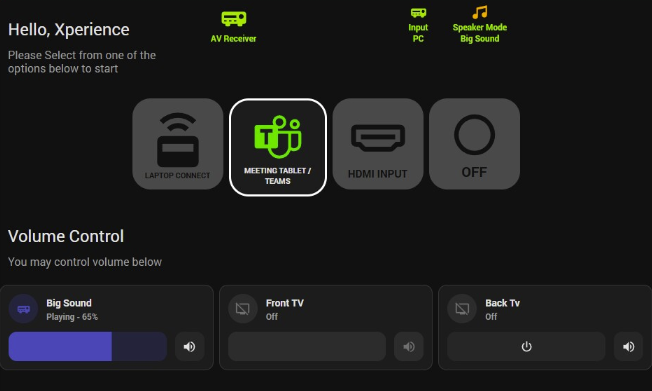
The room has a few defined states — presenting, video call, standby — and an Lovelace dashboard on a wall-mounted tablet that lets anyone switch between them without knowing how any of it is wired. One tap sets the display input, switches the matrix to the right source, sets the receiver to the right input and volume level, and turns everything on in the right sequence.
Sequence control is where Home Assistant earns its keep here. The Sony TV takes a few seconds to be ready after power-on. The receiver needs a moment before it accepts input commands. Home Assistant handles the delays with simple wait steps inside scripts — something that commercial control systems do as a matter of course but that DIY solutions often get wrong. We got it right after a couple of iterations.
We also set up an end-of-meeting automation. After a configurable idle period — no active source, no scheduled meeting on the room calendar — it powers everything down. A calendar integration through Microsoft 365 feeds room availability, so the system knows whether the room is actually in use or just left on.
Why it works in a commercial setting
The honest answer is that Home Assistant is stable when you treat it like infrastructure. That means a dedicated host with a UPS, a controlled update policy, and no experimentation on the production instance. We do not let it auto-update. We test updates on a separate instance first. The conference room install runs on a small NUC with local backups, and it has not needed hands-on intervention since the first few weeks after launch.
The integrations for Sony and Yamaha are mature. Both have been in the Home Assistant ecosystem for years and are actively maintained. The matrix switcher is less glamorous — it is a basic IP-controllable unit, and we communicate with it over a simple socket connection — but it is rock solid in practice.
We were prepared for this to require babysitting. Two years in, it has not. The room runs the same way it did on day one.
What we would do differently
The tablet UI has been rebuilt once since install. The original layout tried to do too much — individual device controls alongside scene controls — and users ignored the individual controls entirely. The current version shows three buttons and nothing else. That is what people actually want: one tap to start, one tap to switch what they are showing, one tap to end. Anything beyond that belongs in a service call, not a room tablet.
We would also document the automation logic more thoroughly from the start. Home Assistant YAML is readable, but two years of tweaks from multiple contributors adds up. We spent time recently cleaning up scripts that had accumulated redundant steps — nothing that caused problems, just noise.
Is this right for every conference room?
No. If you have a large enterprise rollout, need centralized device management across dozens of rooms, or require formal service contracts and certified hardware, a commercial control system is the right answer. That is a real requirement for plenty of clients and we do not talk people out of it. Our AV services cover both approaches.
But for a single conference room at a small or mid-size business — especially one with consumer-grade AV hardware that already speaks IP — Home Assistant is a legitimate option. The cost difference is significant, the flexibility is real, and if you are willing to maintain it like infrastructure rather than a side project, it holds up.
Two years of daily use with no critical failures is not a coincidence. It is what happens when you plan the install properly and stop treating open-source tools as second-class.
What to do next
- Audit your current workflow and list the top three blockers.
- Set a clear owner for rollout, support, and user training.
- Start with one room/site/team, then standardize across locations.
Related service: Digital signage service →
Need help implementing this?
We can scope and deploy the right setup for your Michigan team.